
Create Gifts using your Cricut Machines
For those of you who are not aware, I recently wrote a blog post for Cricut UK. How to create your own Ramadan Calendar to gift a loved one. Have a read, it’s awesome. I now want to show you all how to make flashcards using your Cricut Machine to put in your gift bags.
Now those of you who do not have machines can order the cards from me or buy your machines in various shops. I’ll put some links up for you.
Now for complete and utter transparency, I am a member of the Cricut crew in the UK, but I have been in no way been paid or gifted to write this post.
I absolutely love Cricut. The machines, the brand and the gifts I can create with it. I therefore want to share my knowledge on how you can create your own gifts using the machines.
I used the Cricut joy for my flash cards. The joy is the smallest and cheapest of the Cricut machines, but don’t let the size fool you. It is still a powerhouse of a machine and if you’re an occasional hobbyist or new to discovering Cricut, this is the machine I would start with.
Let’s Make Ramadan Flash Cards Using the Cricut Joy
So let me teach you how to make flash cards. My flash cards are for Ramadan so I have used an Islamic quote and an icon from Cricut Design Space. (Design space is the the Cricut software you would use to create your designs).
Pick Shape of your Ramadan Flashcards
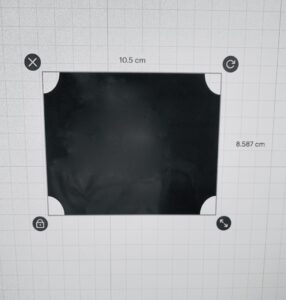
I made this design by picking a shape for my flash cards (I used a square with inverted corners). My flash cards are 10.5 cm wide and 8.5cm long.
Pick Icon and Text for your Ramadan Flashcards
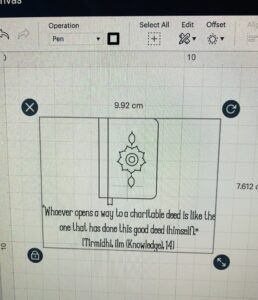
Then I picked the design I wanted. I used the image of The Quran found on design space. (The icon I have used is from the image sets on Design space. If you go on to image sets and Search ‘Ramadan’ you’ll get various icons come up and you can choose which you like).
I also found a quote online and re-sized these to fit inside my card shape. I used the font Dusty Spurs for my cards. This is a writing font. The reason I chose this font is I wanted something that would look written and not be 3d or bubble writing. I highlighted the writing and the icon and changed the operation from basic cut to pen setting. This now means that the icon and text will be drawn on to the card.
Cut and Create on your Cricut Joy
Next I attached the icon and the text to my card shape and sent to draw and cut on my joy.
And there you have it, super simple and super cute flash cards that can be adapted for any occasion.

If you want more Cricut ideas, definitely go check my instagram page or if you want to check out more gift ideas take a look around my blog and get a multitude of ideas.
Also if you’re looking to buy a Cricut Machine, then here are few places you can buy from.
If you want to know more about the Maker 3, check out my blog post.
Please leave your comments and questions below.
Such a great idea to celebrate the holy month of Ramadan!